

One notebook, one pen, and three spreads: monthly, weekly, and daily priorities. That's the entire setup. Maintenance runs a few minutes a week once it's built, and the templates and startup routine below take about 15 minutes to copy the first time you sit down with a blank page.
TL;DR:
- Using a planner with a simplified monthly grid and a weekly spread with a top three prioritization improves task focus without overloading the system.
- Starting a planner at any time, especially mid-week, encourages consistent use and avoids psychological barriers tied to symbolic dates.
- Limiting daily tasks to three and leaving blank space promotes flexibility and minimizes maintenance, making the system more sustainable.
- Incorporating forgiveness for missed days and using a companion app for quick capture helps maintain consistency for ADHD or low-focus individuals.
- Customizing only structural features based on specific frustrations ensures the planner remains simple, functional, and easy to update over time.
Table of Contents
- Building A Minimalist Planner Setup: What Belongs In The Kit
- What Do The Three Core Planner Spreads Look Like?
- How Do You Set Up A Planner And Start Using It Today?
- How Do You Keep A Planner Minimal Instead Of Decorative?
- Can A Minimalist Planner Work For ADHD Or Low-Focus Days?
- Mark's Tested Templates And A 30-Day Trial
- How Do You Customize A Minimalist Planner Without Overcomplicating It?
- What Happens When Your Schedule Changes Unexpectedly?
- A Quick Look At Planner Formats And Tools
- Why Choose A Ready-Made Munkterproducts Planner
- Why Starting Messy Beats Waiting For Perfect
- Sources
Building A Minimalist Planner Setup: What Belongs In The Kit
You need less than you think. An A5 notebook hits the sweet spot for most people. It's big enough to write a full week without cramming, small enough to travel in a bag. A6 works if you're strictly a to-do-list writer and never sketch out a month at a glance, but most people outgrow it fast.

Dotted pages beat lined or blank for a minimalist planner setup because they give you just enough structure to draw a grid without boxing you into someone else's format. Page numbers matter more than people expect. Once your planner has an index and you're flipping to "the page with the dentist appointment," numbering saves real time.
Pick one pen and stick with it. A fine-tip gel pen (0.5mm or so) is legible without bleeding through dotted paper. That's it for tools, plus two small extras worth owning:
- A short ruler or bookmark with a straight edge, for drawing clean grid lines in seconds
- A tiny sticky note pad for temporary reminders you don't want cluttering a permanent page
Skip the rest. Multi-pen color coding, washi tape collections, and sticker sheets are hobbies, not systems. They're fine if decorating brings you joy, but they're also the first thing people abandon when life gets busy, and an abandoned system is worse than no system.
What Do The Three Core Planner Spreads Look Like?
A minimalist bullet journal setup typically runs on three to four core modules and keeps monthly setup time under 30 minutes. Here's what each spread actually looks like on the page.
- Monthly overview. Draw a simple calendar grid, seven columns by five or six rows, and add one narrow column beside it for a running task list. This page exists to anchor dates: birthdays, deadlines, appointments. It's not for daily tasks.
- Two-page weekly spread. Split two facing pages into seven narrow daily columns. Add a small boxed section, usually at the top or bottom, labeled "Top 3" for your three most important tasks that week. Everything else is secondary.
- Compact daily priority list (use only on days that need it). One top priority, three supporting tasks, a line for appointments, and a single line of reflection at the end of the day.
You don't need all three every day. Some weeks the monthly and weekly spreads carry the whole load, and the daily page stays blank until a genuinely packed Tuesday demands it.
Pro Tip: Draw next month's grid the same day you draw this month's weekly spread. It takes two minutes and removes the "I need an hour to set this up" excuse that kills most planning habits by week three.
How Do You Set Up A Planner And Start Using It Today?
Waiting for Monday, the first of the month, or New Year's Day is the single biggest reason planners sit unused in a drawer. Starting mid-week removes what researchers call the "fresh start" trap and tends to improve adherence because you're not waiting for a symbolic moment that never quite arrives.
Here's a first-week setup you can finish in 15 minutes, starting right now, whatever day it is:
- Draw the current month's grid on the first spread. Mark only fixed dates: appointments, deadlines, bills.
- Draw this week's two-page spread, even if half the week has already passed.
- Write your Top 3 for the remaining days of this week in the weekly box.
- Add a one-line daily entry for today only. Don't backfill missed days.
- Set a recurring 10-minute slot, Sunday evening or Monday morning, for your weekly reset.
The weekly reset itself is short: check the monthly grid for anything coming up, pick your new Top 3, and migrate any unfinished tasks from last week onto the new spread. A regular reset paired with Top 3 priorities is one of the more reliable habits for keeping a planner in actual use rather than aspirational use. Budget 10 to 15 minutes for it. If it's taking 30, the system has grown past what you need.
How Do You Keep A Planner Minimal Instead Of Decorative?
The fastest way to kill a planner is to keep adding to it. Every tracker, every extra column, every "just in case" section is a small tax on the time it takes to open the notebook. Minimalist planning isn't about removing everything. It's about letting the planner hold information lightly instead of demanding constant upkeep.
Three rules keep it that way:
- Cap daily tasks at three. Everything else goes on a single running list, a "parking lot" page you review during the weekly reset, not during the day.
- Leave white space on purpose. Blank rows on a weekly spread aren't wasted space, they're buffer room for the unplanned stuff that always shows up.
- Keep one home for appointments. Duplicating dates across a monthly grid, a weekly spread, and a sticky note creates three places to update instead of one, which is exactly the maintenance overhead minimalism is supposed to eliminate.
If a habit tracker, mood log, or gratitude section starts feeling like an obligation instead of a tool, pause it. Don't delete the page, just stop filling it in for a week and see if you miss it.
Pro Tip: Before adding any new feature, whether it's a habit grid or a finance tracker, run it for 30 days first on a scrap page. If you're still using it unprompted after a month, it earns a permanent spot.
Can A Minimalist Planner Work For ADHD Or Low-Focus Days?
Rigid systems fall apart the first time you miss a day, and for anyone with ADHD or attention challenges, one missed day can spiral into abandoning the whole notebook. The fix is building in forgiveness from the start.
- Keep a "quick-capture" zone, a corner of each page reserved for random thoughts you don't have time to sort in the moment.
- Pair the paper system with a voice-first capture app for moments when writing feels like too much friction; speaking a task out loud and having it turn into a structured entry removes the blank-page problem entirely.
- Design for pauses, not streaks. A planner that shames you for a missed week gets closed and never reopened. One that lets you resume on any page, any day, gets picked back up.
For a deeper breakdown of formats built around these exact struggles, Munkterproducts's guide on planners for ADHD adults walks through layout choices in more depth, and a dedicated system like The PurpleLalu's ADHD habit tracker offers a template built specifically around low-friction habit building.
Mark's Tested Templates And A 30-Day Trial
Three templates come up again and again in planner guides worth trusting, and they've held up in practice for exactly the reason you'd expect: they're fast to draw and hard to overbuild.
- Compact monthly grid, roughly 5 minutes to draw, one task column beside it.
- Two-page weekly spread, about 8 minutes, with the Top 3 box built in from day one.
- Capture-zone daily page, under 2 minutes, top third for quick notes, bottom third for tomorrow's priorities.
Run these for 30 days as a genuine experiment. Track three things loosely: whether you opened the planner that day, how many minutes the weekly reset actually took, and whether each page felt useful or just felt like homework. That third measure matters more than the first two. For readers who want the full mechanics behind sustainable daily use, Munkterproducts's piece on why keeping a daily planner works and the practical organization tips that actually stick go further into the habit side of this.
How Do You Customize A Minimalist Planner Without Overcomplicating It?
Customization and complexity aren't the same thing, though most people treat them that way. You can make a planner feel personal without adding a single new page.
Color, when you use it, should carry meaning rather than decoration. One color for fixed appointments, one for flexible tasks, done. That's a functional system, not a coloring project. If you want a project or theme index, add it as a single page in the back rather than a recurring monthly section. It costs you nothing until you actually need it.
The real trick is customizing structure, not content. Maybe your weekly spread needs a slightly wider column for Mondays because that's always your heaviest day. Maybe your monthly grid needs a two-line task column instead of one. Small structural tweaks like these solve a specific, recurring friction point. Adding a mood tracker because you saw it online solves nothing you've actually identified as a problem.

Before adding anything, ask one question: what specific frustration does this fix? If you can't name one, skip it. The planners that survive past month three tend to be the ones that grew slowly, one tested addition at a time, not the ones assembled in a single ambitious weekend.
What Happens When Your Schedule Changes Unexpectedly?
A minimalist planner setup should bend, not break, when plans shift. This is where the intentional white space earns its keep. If your weekly spread has actual blank room, an unexpected meeting or a canceled appointment doesn't require crossing out three lines and squeezing in a rewrite. It just gets written into the space that was already waiting for it.

For bigger disruptions, a single strikethrough and an arrow pointing to the new day beats erasing or starting a fresh page. It keeps a visible record of what actually happened versus what was planned, which turns out to be useful information over time. If a task gets bumped more than twice, that's a signal, not a fluke. Move it to the monthly overview instead of letting it clutter three consecutive weekly spreads.
For readers whose schedules shift constantly, whether from shift work, caregiving, or unpredictable projects, a visual timeline app that shows tasks alongside calendar events can work alongside the paper system, giving you a quick visual gut-check on whether a day is already full before you commit to something new. It's a companion, not a replacement. The paper stays the primary system; the app just catches what paper is bad at, which is showing you your day at a glance without flipping pages.
A Quick Look At Planner Formats And Tools
Most minimalist planner discussions eventually turn into a brand debate, but the format matters more than the label on the cover. Dotted notebooks with numbered pages support the DIY layouts described above. Pre-printed planners with fixed monthly and weekly grids save the drawing step but lock you into someone else's column widths. Digital-only systems win on searchability and syncing across devices, but they lose the tactile, low-distraction quality that makes a lot of people stick with paper in the first place.
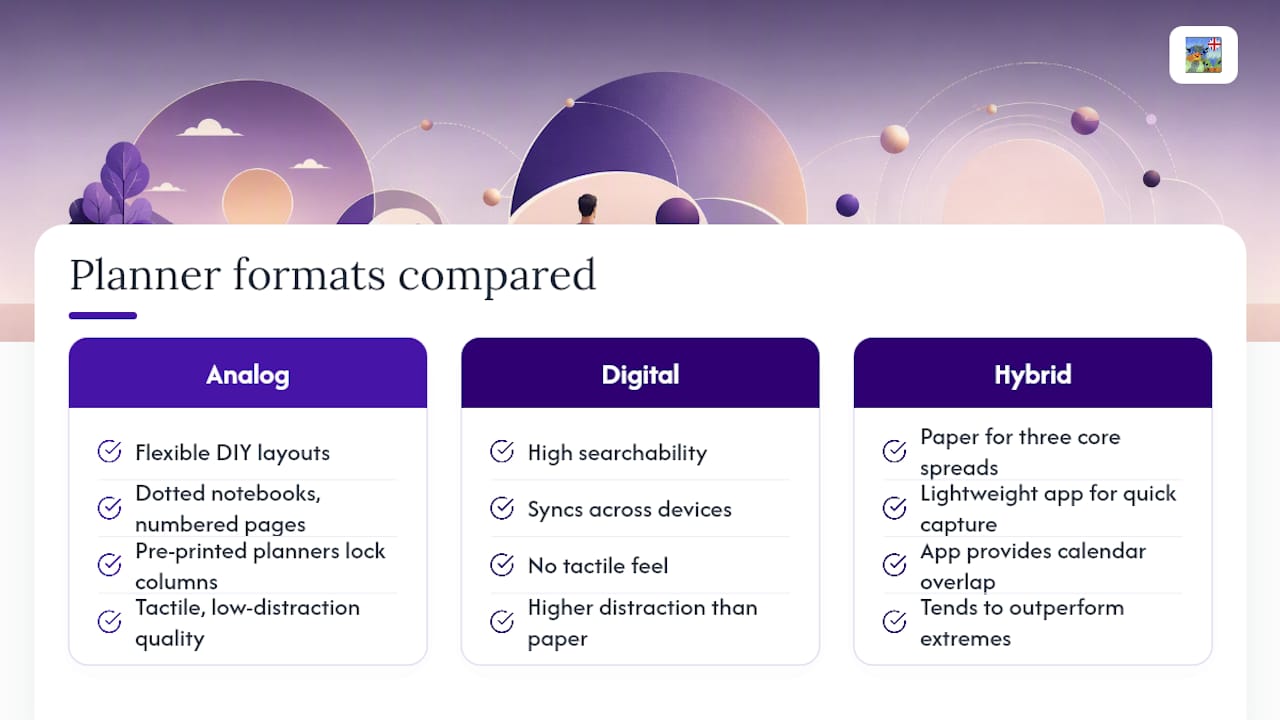
A hybrid approach, paper for the three core spreads and a lightweight app for quick capture or calendar overlap, tends to outperform either extreme for people who've tried and abandoned a fully digital or fully analog system before. The goal isn't finding the "best" tool. It's finding the format that requires the least willpower to open on a bad day.
Why Choose A Ready-Made Munkterproducts Planner
Building your own grid works, but it also takes an evening you might not have. Munkterproducts makes handcrafted planners and notebooks already structured around the same three-spread approach covered above, so the monthly overview, weekly spread, and daily priority format are already on the page instead of something you have to draw freehand every time you start fresh.

If you want a compact format for on-the-go use, look at the journals, notebooks, and planners collection for sizing that matches your handwriting and the amount of daily detail you actually track. Prefer something with built-in variety for slower, more reflective planning sessions? The Fairies colouring book pairs well as a low-pressure creative break during your weekly reset, without turning your actual planner into a decorating project. Pick a size based on how you carry it day to day, add it to your cart, and checkout includes postage with no extra steps.
Why Starting Messy Beats Waiting For Perfect
The best planner setup is the one you actually open on a bad day, not the one that looks flawless on a shelf. Switching to a low-fidelity system, one pen, three spreads, nothing fancy, is what makes a habit stick long enough to matter.
Start today, mid-week if that's when you're reading this, and cut anything that isn't earning its space after 30 days. Try it before you judge it.
— Mark
Sources
- Minimalist Bullet Journal Setup for Professionals
- How to Set Up Your Simplified Planner So You Actually Use It
- Simple (voice-first planner)
- Structured — Daily Planner